Money & Making
Why Aren't My Digital Products Selling? What to Check First
Zero sales doesn't tell you what's broken. It just tells you something is. Here's how to find the leak before you change the price, buy ads or quit.

You made the thing. The beat pack, the preset bundle, the template, the ebook, the course, the sample kit, the Notion planner. You put real hours into it. You set up the page, picked a price, posted the link and waited.
And nothing happened.

No sales. Maybe one from a friend. Maybe a few page views and then silence.
That silence is brutal, because it doesn’t come with an explanation. Nobody emails you to say "your thumbnail was confusing" or "I bounced at checkout because it asked me to make an account." People just leave. So your brain fills in the blank with the worst answer: the product is bad, I’m bad at this, nobody wants what I make.
Sometimes the product really does need work. But most of the time, "nothing sells" is a symptom, not a diagnosis. Something specific is broken somewhere between "a stranger hears about it" and "a stranger pays for it." Your job is to find where.
This article is a diagnostic. Not a hype speech, not a "10 secrets to six figures" list. It’s the order I’d check things in, with real numbers where real numbers exist, so you stop guessing and start fixing the right thing.
One note before we start: this is general information about selling digital products, not financial, legal or tax advice. Platform fees and rules change, so always confirm on the platform’s own help pages before you make decisions.
The simple math behind every sale
Every online sale comes down to one equation:
Sales = visitors × conversion rate.

Visitors here means visits to your product page over a set period, like the last 30 days. Conversion rate is the share of those visits that end in a purchase. Pick one metric and one period and stick with it, because link clicks, page views and unique visitors aren’t the same thing, and mixing them makes the math meaningless.
That’s it. Every problem you have lives in one of those two numbers, and the fix for each one is completely different.
Here’s a hypothetical. Say your page gets 300 visits in a month and 1% of them buy. That’s 3 sales. If you double your traffic to 600 and the conversion rate holds at 1%, you get 6. If you keep 300 visits but raise the conversion rate to 2%, you also get 6.
Same result, totally different work. One is a marketing job. The other is a product page job.
Now here’s the trap: low traffic makes it hard to judge anything. Imagine every visitor had a 1% chance of buying. Even after 100 visits, there would still be roughly a 37% chance of zero sales, just from chance. So a quiet month on a small page doesn’t prove the product is bad. But it doesn’t prove the product is fine either. It just means you can’t tell yet.
So before you touch anything, you need to know which number is broken.
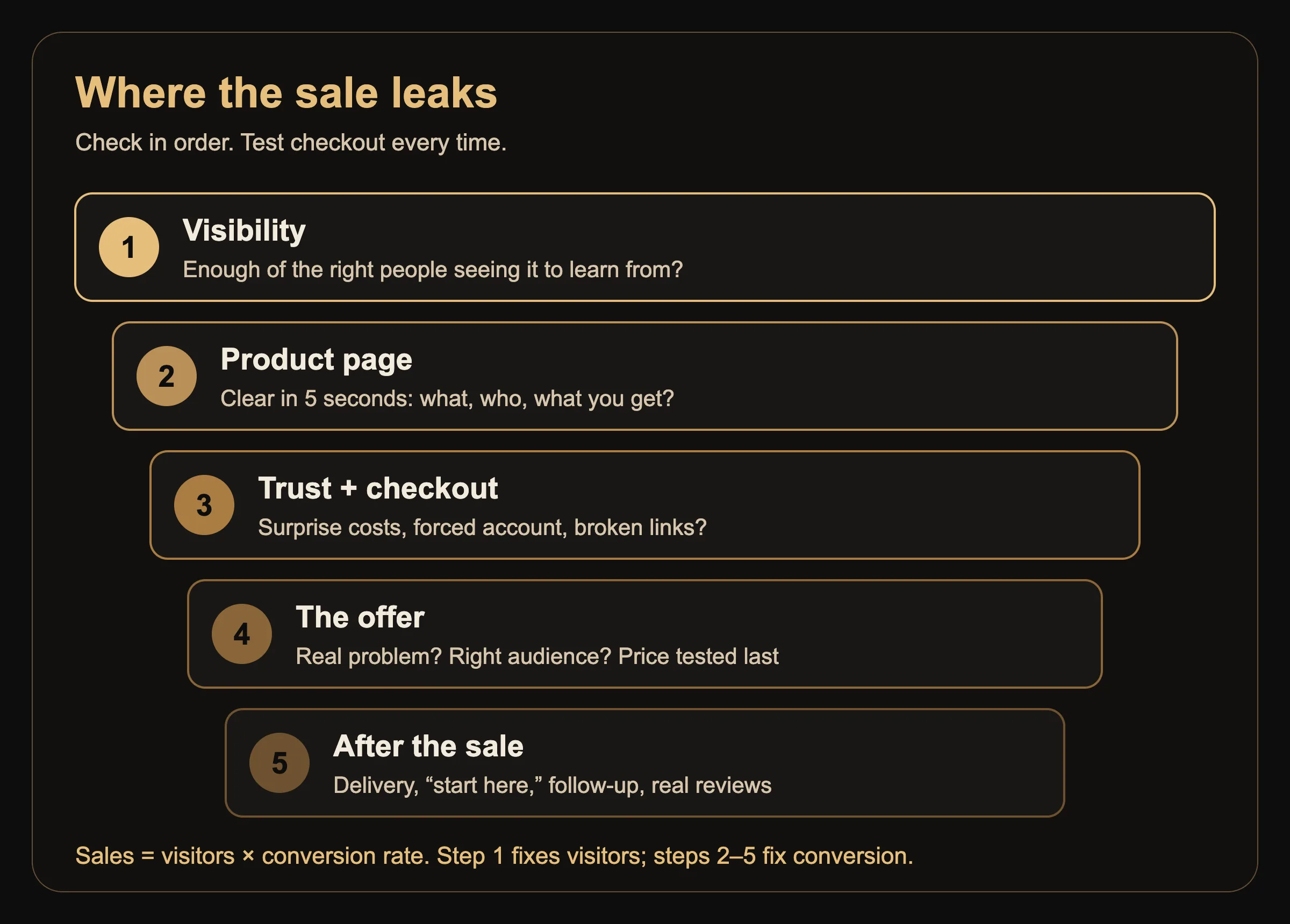
Step 1: Are enough people actually seeing it?
This is the step people skip, and it’s the most common reason for zero sales.

Posting a link once on Instagram is not distribution. Most of your followers never saw that post. Of the ones who did, most didn’t tap the link. Of the ones who tapped, most were on their phone, half-paying attention, in the middle of something else.
So check your actual numbers. Most platforms show them somewhere:
Gumroad, Payhip, Lemon Squeezy, Stan and similar stores show product page views or visits in their dashboards.
Etsy shows views and visits in Shop Stats.
Your own website shows it in Google Analytics or whatever analytics you have installed.
Link-in-bio tools usually show clicks per link.
Then look at two things: how many visits you got, and where they came from. A handful of visits from the wrong crowd tells you very little. A steady stream of visits from people who fit the product and still don’t buy tells you a lot more.
If the numbers are small, more traffic is probably part of the fix. But don’t stop the diagnosis there. A broken checkout or a confusing page can sit underneath a traffic problem, and you’ll want both fixed before you send more people in. Run the checkout test in Step 3 no matter what your traffic looks like.
Where traffic actually comes from
If visibility is the problem, here are the main channels, roughly from fastest to slowest:
People who already know you. Your email list, your text list, your Discord, your close followers. These tend to convert better because trust already exists. If you don’t have an email list, that’s the first thing to start, because it’s the one audience no algorithm can take away from you.
Short-form content that shows the product working. Not "link in bio, go buy." Show the before and after. Play the beat. Show the preset on a real photo. Scroll through the template. People buy what they can picture using.
Marketplace search. Etsy, Gumroad Discover and other marketplaces have built-in shoppers. You trade a bigger fee for access to buyers who are already looking.
Search engines. Blog posts, YouTube videos and Pinterest pins that answer the question your product solves. Slow to start, but the traffic keeps coming without you posting daily. That’s a big part of why this site exists.
Paid ads. Fast, but only worth it once you know your page converts. Paying to send strangers to a page that doesn’t convert just makes the failure more expensive.
The fix for a visibility problem is not a new product. It’s consistent distribution of the one you have.
Step 2: Does the page explain it in five seconds?
If people are visiting and still not buying, the product page is the next suspect.
A visitor lands on your page with almost no context. They’re asking three questions, fast:
What is this?
Is it for someone like me?
What do I get, and what happens after I pay?
If your page doesn’t answer all three in the first screen, a lot of people leave. Not because the product is bad, but because figuring it out felt like work.
What the numbers say about page copy
Unbounce’s 2024 Conversion Benchmark Report analyzed more than 41,000 landing pages and over 57 million conversions. The median conversion rate across all industries was 6.6%, with industry medians ranging from 3.8% to 12.3%.
Those are landing pages in general, not digital product pages specifically, so don’t treat 6.6% as your target. But one finding in that report is useful for anyone selling anything: pages written at a 5th to 7th grade reading level converted at 11.1%, more than double the 5.3% for pages written at a professional reading level. The report also found that word count, reading time and the number of difficult words all had a negative correlation with conversion.
Correlation isn’t proof. But the direction is clear: simple, plain language tends to win.
That’s a big deal for creators, because we love describing our stuff in creative language. "A sonic journey through late-night textures" sounds cool. "40 dark R&B drum loops, 85 to 95 BPM, WAV, royalty-free" tells a buyer exactly what they’re getting.
Product page checklist
Go through your page and check each of these honestly:

A plain title. Say what it is. "Lightroom presets for moody night photos" beats "NOCTURNE."
A one-line outcome. What changes for the buyer? Saves time, sounds better, looks more professional, gets organized.
Who it’s for. Name the person. "For bedroom producers making R&B" or "For small business owners posting on Instagram."
What’s inside, listed. File count, file types, page count, length, format, software needed.
Proof it works. A preview, a demo video, a before and after, a sample page, a short audio clip.
What happens after purchase. Instant download? Email link? Access to a course portal?
License and usage terms. Especially for beats, samples, fonts and templates. Confusion here kills sales.
A clear price and a single button. No hunting for how to buy.
If you can’t check most of these, you likely found your leak.
Step 3: Is something scaring people off at checkout?
Some shoppers get as far as adding something to their cart or starting to pay, and then leave. This is called cart abandonment, and it’s more common than most people think.
The Baymard Institute, which tracks e-commerce research, calculates the average documented cart abandonment rate at 70.22% based on 50 different studies. In other words, roughly seven out of ten online shopping carts are abandoned before the purchase is completed.
A lot of that is normal. People browse, compare and save things for later. Baymard found 42% of U.S. online shoppers abandoned because they were "just browsing." But when Baymard set that group aside and looked at the reasons shoppers gave for abandoning during checkout, a few stood out:
40% said extra costs were too high (shipping, tax, fees).
19% didn’t trust the site with their card information.
18% were required to create an account.
17% found the checkout too long or complicated.
17% ran into website errors or crashes.
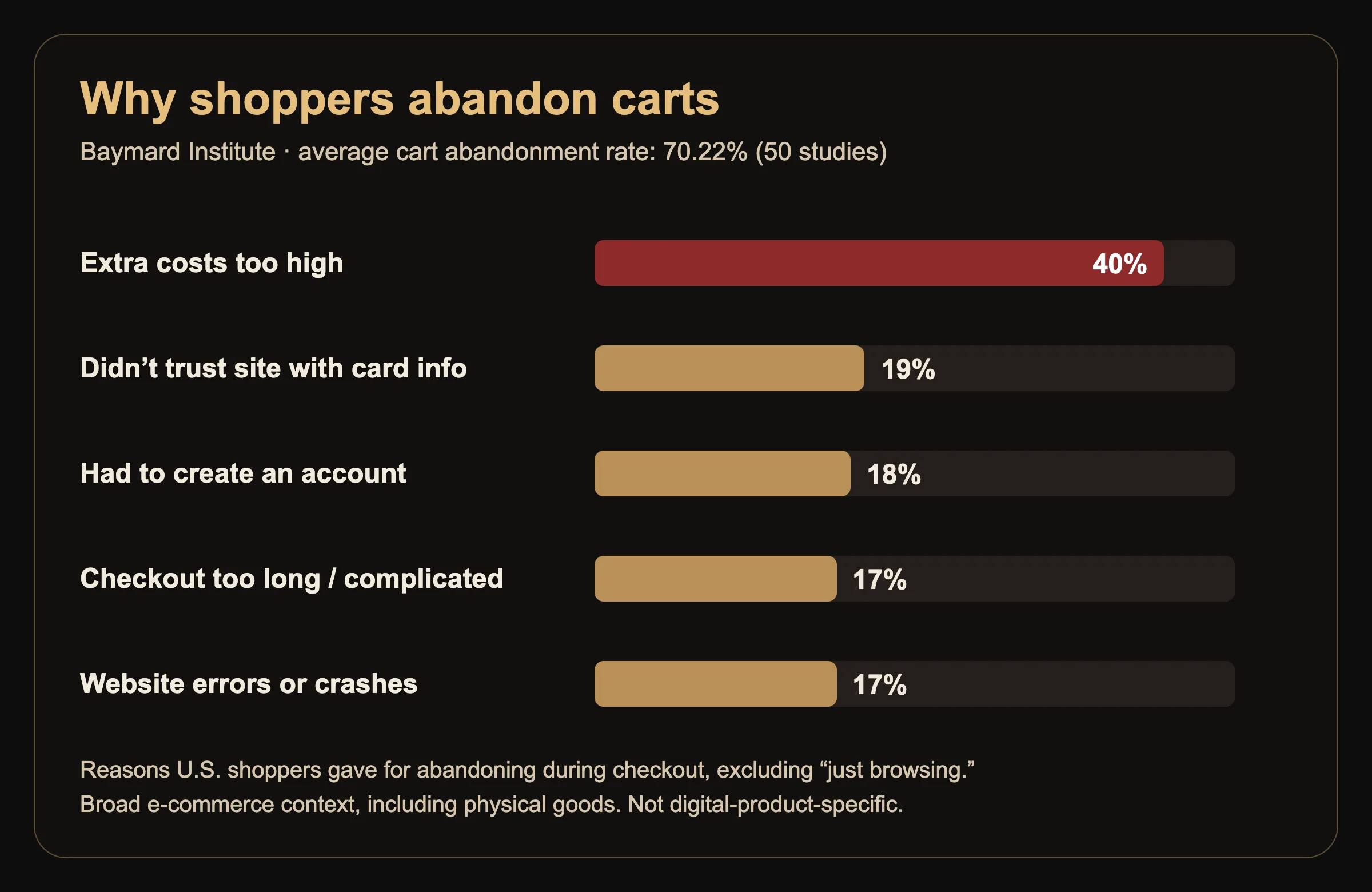
That research covers e-commerce broadly, including physical goods, so treat it as context, not as findings about digital products specifically. The shipping-related reasons won’t apply to you, but the rest map onto digital sales pretty directly.
What this looks like for a digital product
Surprise costs. If your price is $15 and the checkout suddenly shows $17.80 after tax or fees, some buyers feel tricked. Show the real price early where you can, and mention that tax may be added at checkout if that’s how your platform works.
Low trust. A brand-new page with no reviews, no face, no social links and no contact info can feel risky. Add a short "about the creator" line, link your real socials and include an email address for questions.
Forced accounts. If your platform lets buyers check out as a guest, turn that on. Every extra step loses people.
Too many steps or options. Five pricing tiers, three upsells and a pop-up before checkout can overwhelm. Start simple.
Broken things. Run a full test on your phone, start to finish. Use your platform’s test mode or its supported test-purchase method where one exists, rather than improvising. Check payment and delivery as two separate things: did the checkout go through, and did the file or access actually arrive? A sale can process perfectly while the download link is broken. Broken links, expired coupons and pages that don’t load on mobile are real sales killers.

Step 4: Is the offer itself the problem?
If traffic is real, the page is clear and checkout is smooth, and you’re still not selling, it’s time to look honestly at the offer.
This is the hardest step, because it’s personal. But "the offer" isn’t just the product. It’s the product, the price, the audience and the timing together. Often one of those is the weak link, and that’s the one to work on.
Does it solve a problem people know they have?
Products that sell tend to solve a specific, felt problem. "I need my photos to look consistent." "I need drums that hit for this style." "I need a budget that I’ll actually use." "I need to stop starting from a blank page."
Products that struggle tend to be things the creator loved making but buyers can’t connect to a need. That doesn’t mean the work is bad. It means the pitch needs to lead with the problem the product solves instead of the process of making it.
A good test: describe your product to a friend in one sentence without using the word "I." If the sentence is about the buyer’s problem, you’re on track. If it’s about how you made it, rewrite it.
Is it in front of the right people?
You can have the right product and the wrong audience. A sample pack for drill producers posted to a following that mostly watches comedy skits won’t move much, no matter how good it is.
Look at who actually follows you, comments and engages. Then ask honestly whether that group is the buyer for this product. If not, you have two options: make products for the audience you have, or build an audience for the product you made. Both work. Pretending the mismatch isn’t there doesn’t.
Is the price really the problem?
Lowering the price is the first move most sellers make when things don’t sell, and it’s often the wrong one.
If people aren’t seeing the product (Step 1) or don’t understand it (Step 2), a lower price changes nothing. They still won’t buy, just at a discount. And a price that’s too low can make a product look less valuable, especially for professional tools.
Price is worth testing when you have real traffic and a clear page, and people are clearly interested (they ask questions, click buy, add to cart) but don’t follow through. Even then, consider adding value before you cut price. A bonus file, a short tutorial video, a quick-start guide or a bundle can change how the price feels.
Also, know what you actually keep. Platform fees eat into lower-priced items more than people expect.
Example: what fees take from a $20 digital product
These are simplified examples for a single $20 sale paid by a US card, based on published fee structures as of late 2026. They leave out taxes, currency conversion, ads and other extras. Always confirm on each platform’s current fee pages.
Gumroad (standard direct sale, not a Discover or discounted-rate sale): Gumroad’s help page lists 10% + $0.50 per transaction for sales made on its website, and lists credit card processing of 2.9% + $0.30 separately. On a $20 sale that’s $2.50 plus $0.88 in Gumroad’s published card-processing fee, about $3.38 in total.
Etsy (standard sale, US): a $0.20 listing fee and a 6.5% transaction fee under Etsy’s fees policy, plus US payment processing of 3% + $0.25 through Etsy Payments. On a $20 sale that adds up to about $2.35, including processing. If the sale came through Etsy’s Offsite Ads, an extra ad fee can apply.
Fees aren’t bad. Marketplaces bring buyers you wouldn’t reach on your own. But if you drop a $20 product to $5 to "get sales moving," the fixed parts of those fees take a much bigger bite. Run the numbers before you cut.
Step 5: What happens after someone buys?
Most sellers stop thinking at the moment of purchase. But what happens after the sale affects your next sale.
Delivery. Does the buyer get the file instantly? Is the download email clear, or does it land in spam with a confusing subject line? Test it.
First use. Does the product include a short "start here" file? Buyers who can’t figure out how to use something don’t recommend it and sometimes ask for refunds.
Follow-up. A simple thank-you email asking how it’s going opens the door for feedback and reviews. Only use real feedback from real buyers. Fake reviews and made-up testimonials can break platform rules and break trust faster than anything.
Repeat buyers. People who bought once and liked it are your best future customers. If you don’t have a way to reach them again, like an email list, you’re starting from zero every launch.
Reviews and real buyer comments become proof for the next visitor, which loops right back to Step 2. That’s how a product page gets stronger over time.
Change one thing at a time
Once you find the likely leak, resist the urge to change everything at once. If you change the title, the price, the cover image and the platform in the same week, and sales go up, you won’t know which change worked. If they go down, you won’t know which one hurt.
A simple process:
Pick the single most likely problem based on the steps above.
Make one change that addresses it.
Give it time and traffic. Judge it after a meaningful number of visits, not after one day.
Write down what changed and what happened. A notes app is fine.
Then move to the next most likely problem.

This is slower than panicking and rebuilding everything. It’s also how you actually learn what your buyers respond to, which compounds across every product you make after this one.
The checklist: save this and run it anytime
Bookmark this page or screenshot this section. Run through it in order whenever a product goes quiet. The first "no" is usually where to start, but run number 3 every time, whatever your other answers are.
1. Is the right kind of traffic reaching the page, and enough of it to learn from? If visits are low or coming from people who don’t fit the product, work on distribution, and keep going down the list.
2. Could a stranger tell what it is, who it’s for and what they get within five seconds? If no, rewrite the top of the page in plain language.
3. Have you recently tested checkout and delivery on a phone, using test mode or a supported test purchase, and confirmed both work? If no, test and fix both.
4. Can you describe the buyer’s problem in one sentence, and is your audience made of those buyers? If no, sharpen the pitch or match the product to your audience.
5. Do buyers get a clear delivery, a "start here" guide and a follow-up? If no, build that so every sale helps the next one.
If everything is a "yes" and sales are still slow, then it’s time to test price, test a bundle or test a new angle on the same product, one change at a time.
The mindset part, kept short
Zero sales feels personal. It isn’t a verdict on your talent or your worth. It’s information about a system, and systems can be fixed.
The creators who end up making real money from digital products usually aren’t the ones whose first product hit. They’re the ones who treated the first product like a test, found the leak and kept going.
Make it, put it in front of people, find the leak, fix one thing, repeat. That’s the work.
If the fear of putting something out there is part of what’s slowing you down, I wrote about that in I Finished the Song. Why Am I Afraid to Release It?. And if your day job is draining the energy you need to build this, read My Job Takes All My Energy. How Do I Keep Creating?.
Quick answers
Why is my digital product getting views but no sales? Views without sales usually points to the product page, checkout or offer. Make sure a stranger can tell what it is, who it’s for and what they get within a few seconds, then test the checkout yourself on a phone.
How many visitors do I need before judging a product? There’s no universal number. Low traffic just makes results harder to read, because zero sales can happen by chance. Look at how many visits you got and whether they came from people who fit the product, and test your checkout either way.
Should I lower my price if nothing is selling? Usually not first. If people aren’t seeing the product or don’t understand it, a lower price won’t fix that. Test price only after traffic, page clarity and checkout are solid.
What’s a good conversion rate for a digital product? It varies a lot by product, price and traffic source. Unbounce’s 2024 report found a 6.6% median for landing pages across industries, but that’s a broad benchmark, not a target for every product.
Is Etsy or Gumroad better for selling digital products? They work differently. Marketplaces like Etsy offer built-in shoppers for higher total fees, while standalone stores usually rely on you to bring traffic. Check each platform’s current fee page and decide based on where your buyers already are.